


- Thread Author
- #1
How do I upload files into my MUGEN/IKEMEN website?
Here you can share characters, stage backgrounds, storyboards, and other content on our website.
How to Upload a Character?
1. Go to our main page forum and choose the Download tab section; this will take you to our Resources section.
2. Look at the left side of the website; you see an File Box Categories section tab

This is where you can choose what categories you would like to pick. if you want to upload characters, stage backgrounds, storyboards, and other content on our website. You need to pick the RIGHT set of categories and choose the right categories of the characters, stage backgrounds, storyboards, and other content.
for a good example.
If you have Neo Geo SNK fighter characters that you would like to share and upload to our community.
This is how it's done.
1. Choose the Characters tab.
2. On the Character list tab, scroll down and choose Video Game Characters, then scroll a bit more and find SNK.
3. On the SNK tab you see other video game characters made by SNK. Choose what game that character belongs to.
4. On your right hand's top side, you see a yellow button, Upload File.

5. Fill the Information for the Character
We require you to fill in all the information for the character you're trying to share.
Here are the following requirements:

Once you're here, be sure to give a title banner for your characters, stage backgrounds, storyboards, and other content.

Once you complete filling out the information for the character, you want to share it with the community.
you can easy-peasy hit the Save button.

Also we have video for you to watch as well.
Here's a video in case this helped.
Here you can share characters, stage backgrounds, storyboards, and other content on our website.
How to Upload a Character?
1. Go to our main page forum and choose the Download tab section; this will take you to our Resources section.
2. Look at the left side of the website; you see an File Box Categories section tab
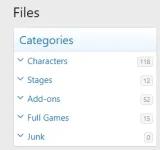
This is where you can choose what categories you would like to pick. if you want to upload characters, stage backgrounds, storyboards, and other content on our website. You need to pick the RIGHT set of categories and choose the right categories of the characters, stage backgrounds, storyboards, and other content.
for a good example.
If you have Neo Geo SNK fighter characters that you would like to share and upload to our community.
This is how it's done.
1. Choose the Characters tab.
2. On the Character list tab, scroll down and choose Video Game Characters, then scroll a bit more and find SNK.
3. On the SNK tab you see other video game characters made by SNK. Choose what game that character belongs to.
4. On your right hand's top side, you see a yellow button, Upload File.

5. Fill the Information for the Character
We require you to fill in all the information for the character you're trying to share.
Here are the following requirements:
- Name of the Character
- Name of Author/Creator
- Picture or Video Gameplay of the Character
- What version engine was the character made with for "MUGEN or IKEMEN"
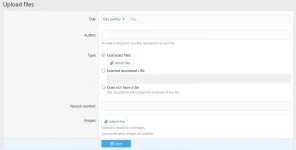
Once you're here, be sure to give a title banner for your characters, stage backgrounds, storyboards, and other content.
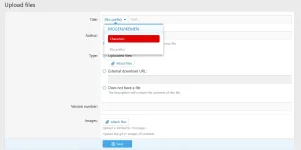
Once you complete filling out the information for the character, you want to share it with the community.
you can easy-peasy hit the Save button.

Also we have video for you to watch as well.
Here's a video in case this helped.