Welcome!

By registering with us, you'll be able to discuss, share and private message with other members of our community.

SignUp Now!

IKEMEN GO Module (pre-selected teams)

lhadias

Members
Lvl 1
Joined
Jun 3, 2026
Messages
10
Reputation score
0
1781148501806.webp1781148512401.webp

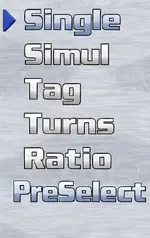
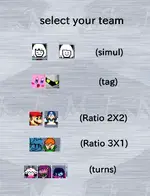
I'm looking for an ikemen go module that adds a team configuration similar to MVC3 and DB FighterZ
 
I know this, I was told this by a friend before, when I too was curious about preselect but never used it though just curious they said:

"to get PreSelect mode, press the Down Arrow key on your keyboard or controller two times until the arrow on your screen moves from Single down to PreSelect. Then, press your Accept / Confirm button (usually the A or X key on your keyboard).
If pressing down does not work, the menu might be locked. You can fix this by enabling it in your game files:
  1. Open your main Ikemen GO folder.
  2. Open the data folder.
  3. Open the system.def file using a text editor like Notepad.
  4. Search for [Select Info] by pressing Ctrl + F.
  5. Look for a line that says preselect.enabled = 0 and change the 0 to a 1.
  6. Save the file and restart your game"
 
I know this, I was told this by a friend before, when I too was curious about preselect but never used it though just curious they said:

"to get PreSelect mode, press the Down Arrow key on your keyboard or controller two times until the arrow on your screen moves from Single down to PreSelect. Then, press your Accept / Confirm button (usually the A or X key on your keyboard).
If pressing down does not work, the menu might be locked. You can fix this by enabling it in your game files:
  1. Open your main Ikemen GO folder.
  2. Open the data folder.
  3. Open the system.def file using a text editor like Notepad.
  4. Search for [Select Info] by pressing Ctrl + F.
  5. Look for a line that says preselect.enabled = 0 and change the 0 to a 1.
  6. Save the file and restart your game"
i couldnt find "preselect.enabled" in my system.def
 
i couldnt find "preselect.enabled" in my system.def
Hey! So there was a small mix-up with the files. the option isn't in system.def. mb (and sorry for the very late reply been busy)
also, "PreSelect" just changes the menu order (picking characters first). It won't give you that Marvel vs. Capcom or Dragon Ball FighterZ 3v3 tag gameplay.

To get that, you actually want to use the Tag mode on your screen.
Here is how to fix the missing setting and turn on 3v3 tags:

1. Fix the PreSelect setting (if you still want it)
  1. Go to your main Ikemen GO folder.
  2. Open the save folder.
  3. Open config.json with Notepad.
  4. Press Ctrl + F and search for "PreSelect".
  5. Change the value next to it from false to true.
  6. Save and close.

2. Turn on 3v3 Tag Gameplay (MVC3 / DBFZ Style)
  1. Go to your Ikemen GO folder, then open data.
  2. Open system.def with Notepad.
  3. Press Ctrl + F and search for [Tag Info].
  4. Make sure the lines under it look like this:
    • tag.enabled = 1
    • tag.max = 3 (This lets you pick 3 characters)
  5. Save and close.
Once you do that, open the game, select Tag on that menu screen, and you will be able to pick a team of 3!
 

Users who are viewing this thread

Back
Top